Showing the case assignee in CM/Track (#650518, #667594)
CM/Track V3 now has an optional feature to display the case assignee in the case list and in the case header. This enables use cases where it is important for the contacts to see who is working on their cases.
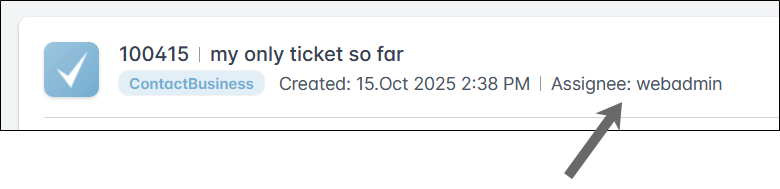
The assignee is not shown in the context of FAQs.
Configuration in the Web Admin Suite
The setting Show the name of the case assignee has been added to the General settings section of the Portal configurations page. By default, it is set to false, so that the assignee is not shown. You need to change this setting to true to display the assignee.
In addition, sending assignee data via REST API needs to be activated by setting No assignee name in REST response (system property cmas‑restapi‑core, security.exclude.engineer.data) in the General tab of the Global portal settings page to False.
Optionally, you can create a dedicated template for determining the assignee name and reference it in the Template for the assignee name field (system property cmas-restapi-core, engineer.rest.template.name). By default, the default template, as defined in the system property cmas‑core‑server, engineer.description.template.name is used.
When retrieving the case list via REST API using the rest_response_ticketextlist template, the assignee name is now returned based on the template defined in the system property cmas-restapi-core, engineer.rest.template.name.