MCP server for using external AI agents (#668409)
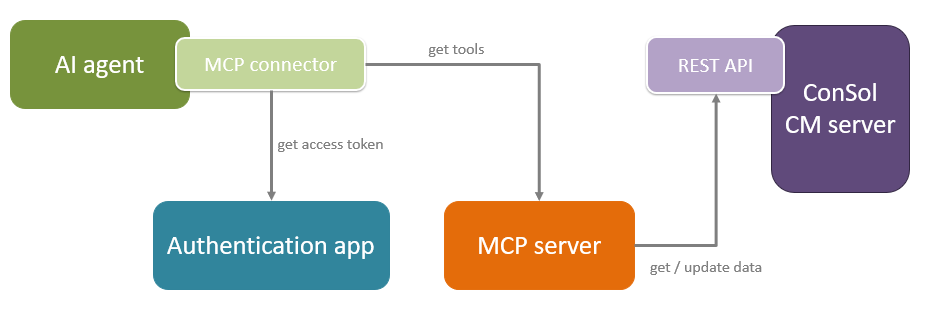
ConSol CM has been extended with a new component, an MCP server. It serves as an interface for external AI agents, so that they can access and modify data in ConSol CM. The MCP server is an interface, with the following main purposes:
- Authenticate the AI agent in ConSol CM as a user with the corresponding permissions
- Enable the AI agent to correctly use the ConSol CM REST API.
The MCP server provides a number of tools for this purpose:
Working with cases:
- addCommentToTicket: Add a comment to a case
- assignMeToTicket: Assigns the current user to the case
- createTicketWithContactAndCustomFields: Create a case in a selected queue
- executeTicketActivity: Execute an activity for a case
- getFAQTickets: Get FAQs
- getMyTickets: Get cases assigned to you
- getTicketActivities: Get available activities for a case
- getTicketActivityForm: Get an activity form to be filled out for an activity
- getTicketsByQueueAndScope: Get cases of a queue, optionally narrowed to a single workflow scope
- getTicketByName / getTicketByNameWithAllData: Get a case by its name
- getTicketsByView: Get cases a view by its technical name
- searchTickets: Search cases by keyword
- unassignMeFromTicket: Unassigns the current user from a case
- updateTicket: Update case fields
Search results can be sorted newest first (default), oldest first or last modified first.
Working with contacts:
- getContactById: Get contact by ID
- getMyContacts: Get contacts you can create cases for
- searchContacts: Search contacts by keywords
Configuration data for working with cases:
- getAvailableDataFieldsForDataFieldsGroup: Get data fields in a data field group
- getAvailableDataFieldsForTicket: Get data fields for a specific case
- getAvailableDataFieldsGroupsForQueue: Get data field groups for a queue
- getAvailableFAQQueues: Get available FAQ queues
- getAvailableQueues: Get available queues
- getAvailableViews: Get available views
- getQueueByName: Get queue metadata (e.g., customerAssignmentType)
- getQueuesWithScopes: Get available queues with workflow name and scope list
Only data to which the user has access according to his permissions is retrieved and the agent is only allowed to perform the actions which the user has permissions for.
The MCP server can only be used together with an AI agent and a Large Language Model (LLM). Both the AI agent and the LLM need to be provided by the customer. They are not in scope of the delivery.
The quality of the agent interaction depends on the agent and the model. You need to use a model with agentic capabilities, as for example Anthropic Claude or OpenAI GTP 5.5 or higher.
AI agents can perform bulk actions on your data using the MCP server. This can result in lots of REST API calls, which can impair overall system performance.
To prevent accidental overusage of system resources, a limit of one page with 20 elements is applied to case, contact and resource searches by default. This means that the agent cannot loop over more than 20 items at once. If you want to allow a higher resource usage, you can add the following parameters to your start command:
MCP_PAGINATION_MAX_PAGE_SIZE: Increases the page size. The default is 20.MCP_PAGINATION_MAX_PAGE_NUMBER: Increases the number of pages the agent can retrieve. The default is 0, which means only the first page.
By default, a pattern search is performed to find matching FAQs. The start parameter MCP_FAQ_MODE has been introduced to switch between a pattern and a full search. It can have the following values:
PATTERN(default): The index is used to find matching FAQsFULL: As many FAQs as allowed according to the maximum page size and number are retrieved and the agent's capabilities are used to find the requested information. This setting can lead better results, but increases the token usage and system load. It is only recommended in szenarios with a small number of FAQs.
Architecture
The communication between the MCP server and ConSol CM is done via REST API. Bearer tokens are used for authentication. The user is forwarded to the ConSol CM login page, where he needs to log in with his regular credentials. The agent then receives a token which allows him to act in the permission context of this user, see Support for bearer token authentication added (#667818).
Configuring the MCP server
Two steps are needed for using the MCP server:
- The administrator needs to deploy it on the application server or run it as a standalone application.
- The administrator needs to configure the MCP server on the Authentication page of the Web Admin Suite.
- The user needs to configure the MCP server in his AI agent. The exact steps depend on the agent. Usually, it is needed to provide the URL where the MCP server is running and its client ID and secret as defined in the Web Admin Suite.
Web Admin Suite changes
The Authentication page has been extended with the section OIDC for AI agents. The settings are the same as for OIDC for other clients. They are prefilled with the correct values for the internal OIDC provider automatically. You need to set OIDC enabled to true to be able to use the MCP server.
The settings are saved to system properties starting with oidc.ai_agent in the module cmas-core-security.